
The best AI agent for video editing is the one that leaves you a timeline you can still fix by hand. For most people that means pairing a general agent they already pay for, such as Codex, Claude Code or Gemini in Antigravity, with an editor the agent can drive. If you’d rather not set anything up, use an editor with its own agent built in, such as ChatCut, Descript or Kapwing. For editing from your phone, Grok Bot is the only agent here that ran a full edit without a computer.
ChatCut makes one of the tools on this list, and it’s the editor most of the other agents were connected to. We ran five of these agents on our own footage, connected to ChatCut, and timed each edit: four in November 2026 and ChatGPT in August. The other five are described from their official documentation. Every entry, including ours, lists where it falls short.
Key takeaways
- An AI agent can’t cut your video on its own. It needs an editor it can control, either built into the same app or connected through MCP, and what you get back depends on that editor.
- If you already use Codex or Claude Code, connect it to an editor rather than paying for another agent. In our tests Codex batch-edited three clips in about 13.5 minutes, and Claude Code turned a 40.8-second clip into a 30.4-second vertical cut in 4 minutes 47 seconds.
- Grok Bot runs on its own cloud computer, so it can finish an edit you start on your phone.
- Descript Underlord and Kapwing Kai keep the agent inside one editor. That’s simpler to start with, but you can’t switch the agent or model.
- For generating new footage, avatars or clips from scratch, see our wider guide to AI video agents. This list is only about editing footage you already shot.
How do the best AI agents for video editing compare?
| Agent | Best for | Where it runs | What you edit afterward | What you pay for | We ran it |
|---|---|---|---|---|---|
| ChatCut | Agent and timeline in one window | macOS 13+, Windows 10+, web | Multi-track timeline | Free plan; paid from $25/month (100 credits) | As the editor in rows 2–6 |
| Codex + ChatCut | Batch-editing a folder of clips | ChatGPT desktop app, Codex CLI | Multi-track timeline | Your ChatGPT plan | Yes |
| Claude Code + ChatCut | A fast first cut you revise in chat | Claude desktop app, claude CLI | Multi-track timeline | Claude Pro, Max or Ultra | Yes |
| Gemini in Antigravity + ChatCut | Gemini users | Antigravity app and CLI | Multi-track timeline | Your Antigravity allowance | Yes |
| Grok Bot + ChatCut | Editing from your phone | Grok Bot app (desktop and mobile) | Multi-track timeline (web) | The X Subscription (from $30/month) | Yes |
| ChatGPT + ChatCut | One video without a terminal | ChatGPT desktop app | Multi-track timeline | Your ChatGPT plan | Yes (August 2026) |
| Cursor + ChatCut | Working inside an IDE | Cursor editor and CLI | Multi-track timeline | Cursor Free or a paid plan | No |
| CapCut for Codex | Finishing in CapCut | Codex, ChatGPT desktop app | CapCut project | Your CapCut plan | No |
| Descript Underlord | Recording-led edits in Descript | Descript’s editor | Descript project | Free; Hobbyist from $16/month | No |
| Kapwing Kai | Mixed media in a browser | Web | Kapwing project | Free with watermark; Pro from $16/month | No |
How did we pick and test these agents?
We only included agents that can edit footage you already have, not just generate new clips, and that leave you a project you can open and change. For the agents we ran, the job was a real talking-head edit: transcribe, cut fillers and pauses, reframe to 9:16, add captions, export. The source clips and run dates differ between agents, so the timings below are not a head-to-head benchmark. They show what one real session took. ChatCut credits are listed only where a run spent them; the agents’ own subscription costs were not measured. Prices and plan details come from official pages checked on November 25, 2026.
1. ChatCut: best for agent and timeline in one window
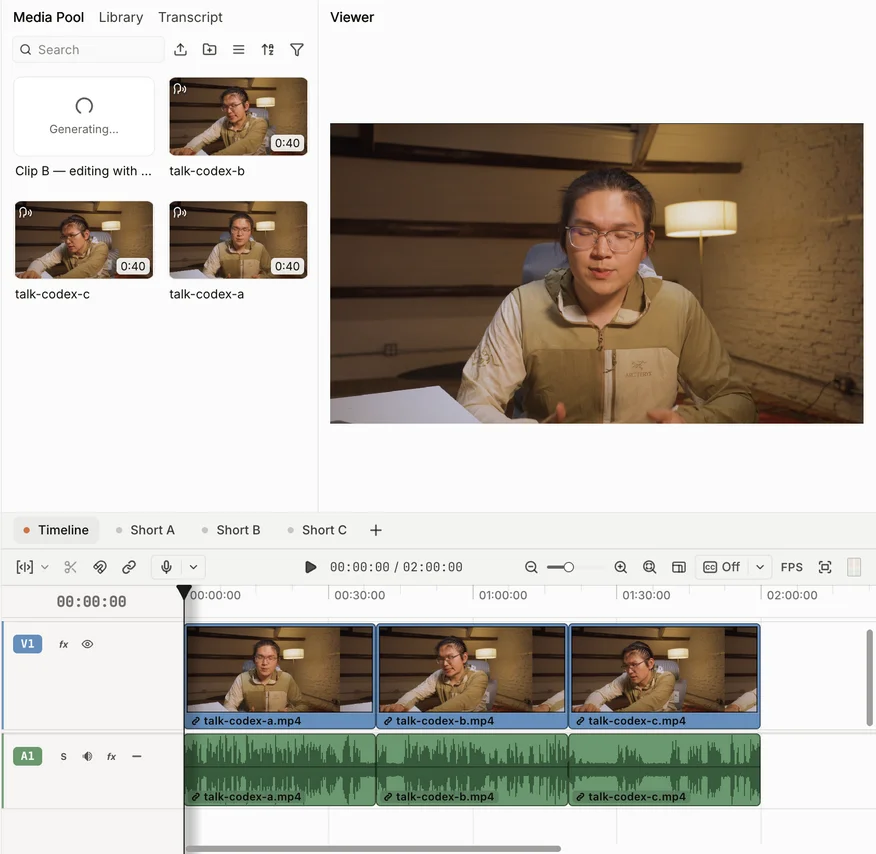
ChatCut is an AI video editor where you type the edit, such as “cut the long pauses and add captions”, and an agent makes the change on a real multi-track timeline you can keep adjusting by hand. In ChatCut Desktop you can keep the built-in agent or switch the AI panel to Claude Code, Codex CLI, Antigravity, Hermes Agent and several other agents through Agent Selection, so the chat sits beside the viewer and timeline (Product Facts).
Best for: people who want one app for the conversation and the timeline, and who may want to try more than one agent on the same project.
What we ran: every connected-agent test in this list (entries 2 to 6) edited a ChatCut project, so the cuts, captions and exports below are ChatCut’s. Cutting, transcription, captions and local exports cost 0 credits in all of them.
Pros
- The timeline stays editable after the agent finishes, and you can export MP4, XML for Premiere Pro or DaVinci Resolve, or a CapCut draft from Desktop (Exporting).
- Desktop renders on your computer, up to 4K depending on your plan.
Cons
- It needs an internet connection, the built-in agent uses ChatCut credits, and there’s no Linux app.
- It isn’t built for frame-level color grading.
Price: a Free plan covers editing, transcription, captions and local export; paid plans start at $25/month for 100 credits, and AI video and image generation need a paid plan.
2. Codex + ChatCut: best for batch-editing a folder of clips
Codex is OpenAI’s coding agent, available in the ChatGPT desktop app and as Codex CLI. On its own it has no video timeline; connected to ChatCut Desktop it can import a folder, cut each clip and export the results (setup).
Best for: repeating the same edit across many clips, because Codex is good at working through files and checking the exports with command-line tools.
What we ran: on November 18, Codex CLI turned three 40-second talking-head takes into three captioned 9:16 shorts in about 13.5 minutes, reusing one caption style, one title card and one music bed across all three. The only ChatCut charge was 2.88 credits for one generated B-roll shot (full walkthrough).
Pros
- Folder-level work is where it shines: one prompt applied the same packaging to every clip.
- Codex reasoning runs on your ChatGPT plan, not ChatCut credits.
Cons
- It needs ChatCut Desktop running on the same Mac or Windows PC.
- Results depend on the model and reasoning level you pick.
Price: Codex is included in ChatGPT plans, starting with Free; access in Codex CLI depends on your plan or an API key (OpenAI Codex pricing).
3. Claude Code + ChatCut: best for a fast first cut you revise in chat
Claude Code is Anthropic’s agent for the terminal and the Claude desktop app’s Code tab. Connected to ChatCut Desktop, it edits the same kind of timeline (setup).
Best for: getting a usable first cut quickly, then steering it with short follow-up messages.
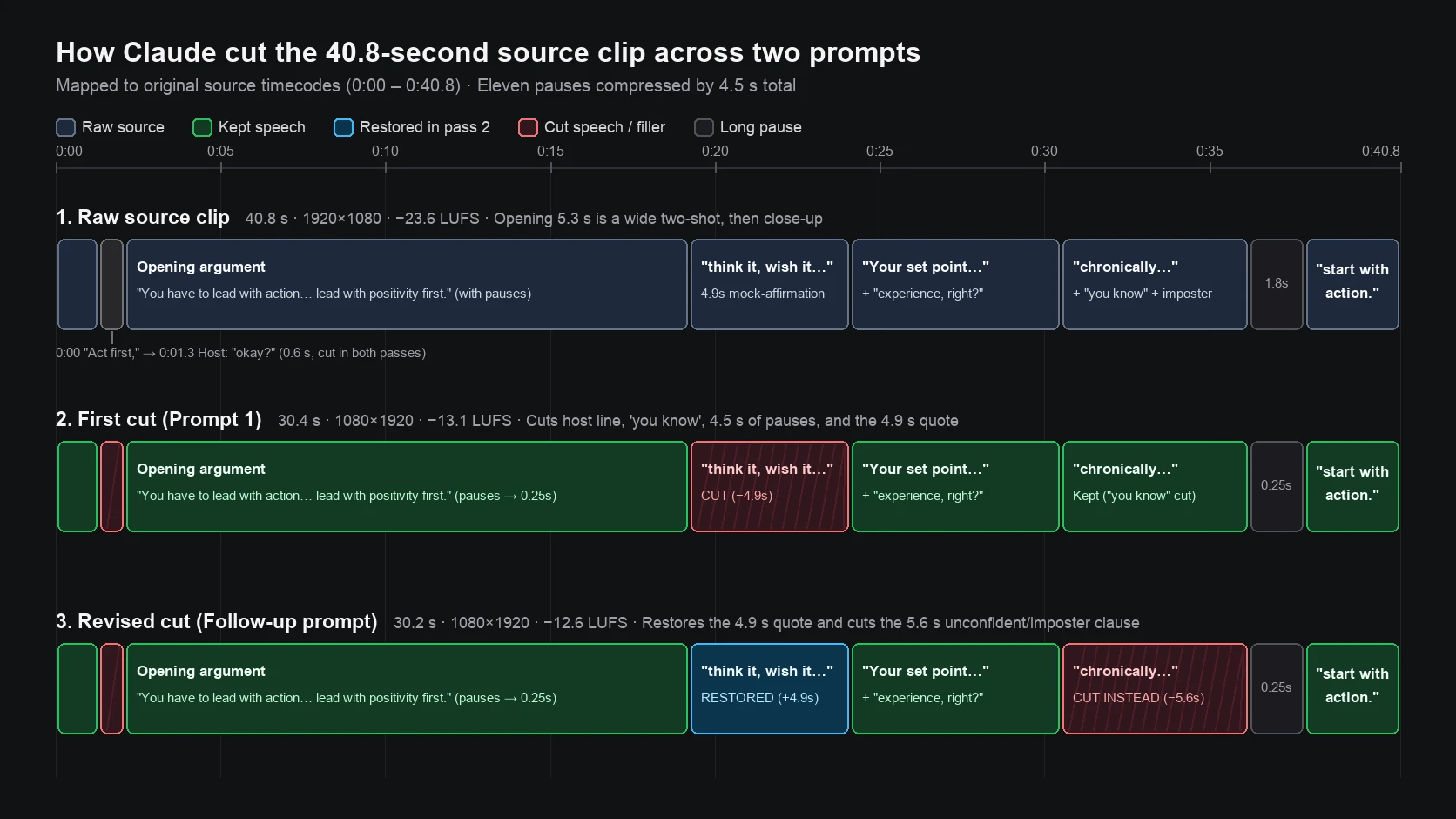
What we ran: on November 15, Claude Opus 5.5 in Claude Code turned a 40.8-second podcast clip into a 30.4-second vertical MP4 in 4 minutes 47 seconds: it cut a host interruption, tightened 11 pauses, added captions and raised loudness from −23.6 to −13.1 LUFS. The first cut dropped the clip’s best line to hit our 30-second target, and said so; one follow-up prompt put it back (test notes).
Pros
- Fast, and it explains its edit choices, which makes the follow-up easy.
- Reasoning runs on your Claude plan.
Cons
- Needs ChatCut Desktop locally; Claude’s website can’t install the plugin.
- A first cut that hits a time target can drop lines you’d keep; review before exporting.
Price: included with Claude Pro, Max and Ultra, or billed through the Anthropic API.
4. Gemini in Google Antigravity + ChatCut: best for Gemini users
Google doesn’t ship a standalone Gemini video editor. The way to have Gemini edit your footage is Google’s Antigravity agent with the ChatCut plugin, which adds ChatCut’s tools and about 30 editing skills (setup).
Best for: people who already work in Google’s tools, or who want Gemini Omni to restyle a shot inside the same project.
What we ran: on November 15, Gemini 4 Carbon in the Antigravity CLI turned a 30.1-second, two-take studio recording into a finished 15.8-second 1080p cut. Cutting, captions and export used 0 credits; six optional generations, including a Gemini Omni restyle, came to 11.07 credits (test notes).
Pros
- Gemini handled a messy two-take recording, including an apology and a stumble mid-sentence.
- You can also pick Antigravity as the agent inside ChatCut Desktop.
Cons
- Needs ChatCut Desktop locally.
- You need Google’s Antigravity CLI installed and signed in.
Price: Antigravity’s own usage allowance covers Gemini’s reasoning; check Google’s Antigravity site for current plans.
5. Grok Bot + ChatCut: best for editing from your phone
Grok Bot is xAI’s agent, and it runs on its own persistent cloud computer. Because ChatCut connects to it over the web, you can start an edit on your desktop and finish it from your phone (setup).
Best for: creators who edit away from their computer.
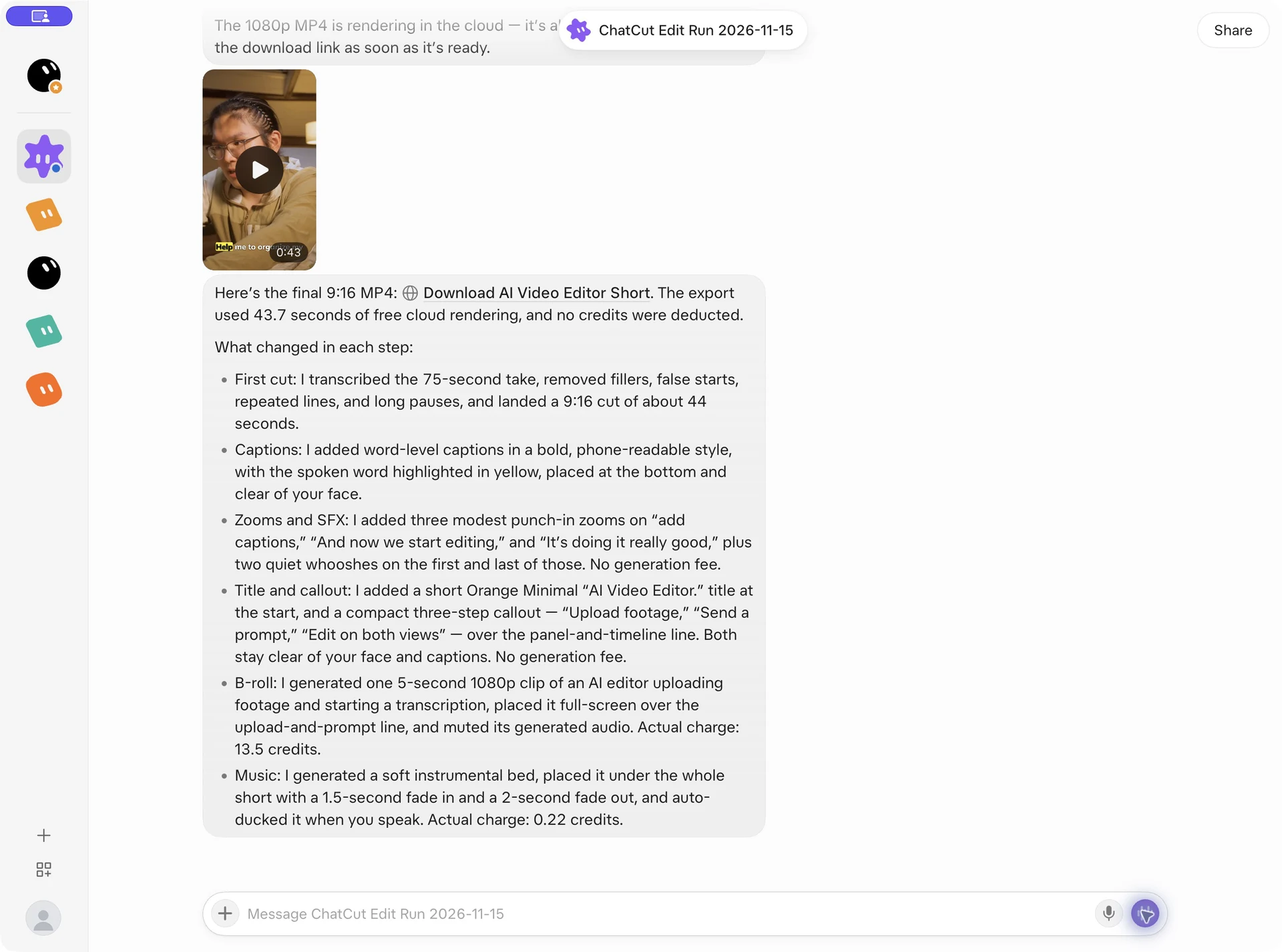
What we ran: on November 14 and 15, connecting ChatCut took 53 seconds with one message, and Grok Bot turned a 75.0-second raw take into a 43.8-second 9:16 short with word captions, zooms, motion graphics, a generated B-roll shot and music in 37 minutes 54 seconds. Generation cost 13.72 credits; everything else was free (full walkthrough).
Pros
- The only agent here that completed a full edit without a local computer.
- It reports credits per step, so generation costs are easy to track.
Cons
- Slowest of our runs, partly because each step waits on cloud tools.
- It edits in ChatCut’s web editor, so exports render in the cloud rather than locally.
Price: an eligible plan from The X Subscription: Premium $30/month, Super $100/month or Ultra $200/month.
6. ChatGPT + ChatCut: best for one video without a terminal
In the ChatGPT desktop app, ChatGPT and Codex share one plugin directory, so you can connect ChatCut and describe your edit in an ordinary chat (setup).
Best for: one video at a time, if you don’t want to open a terminal.
What we ran: in August 2026 we used ChatGPT with ChatCut to turn one long talking-head video into three vertical shorts with captions and reframing (test notes). That test predates the current desktop app, so treat it as an example of the workflow, not a current timing. Our step-by-step ChatGPT guide has the setup.
Pros
- The most familiar interface on this list.
- The agent’s work runs on your ChatGPT plan.
Cons
- The ChatGPT website can’t install the plugin; you need the desktop app.
- For many clips at once, Codex is the better fit.
Price: your ChatGPT plan covers the conversation.
7. Cursor + ChatCut: best if you already work in an IDE
Cursor supports MCP servers, so you can add ChatCut Desktop as a local server and let Cursor Agent edit while you work on code (setup).
Best for: developers who build product videos or demos next to their code.
What we know: we documented the setup from Cursor’s MCP docs but didn’t run an edit in Cursor. With ChatCut connected, Cursor Agent gets the same editing tools as the agents above; its edit decisions can differ (guide).
Pros
- No new app if you already live in Cursor.
- Supports local
stdioMCP servers, which ChatCut Desktop uses.
Cons
- Doesn’t work from Cursor’s cloud agents or remote SSH workspaces, because ChatCut Desktop must be on the same computer.
- Not tested by us.
Price: Cursor’s Free plan includes limited Agent use; paid plans start at $8/month (Plus), and third-party frontier models need Premium ($30/month) or higher.
8. CapCut for Codex: best if you finish in CapCut
CapCut’s official Codex plugin registers an MCP server named capcut_creation and signs in to your CapCut account. As of November 21 it supports Codex and the ChatGPT desktop app, not Claude Code (our CapCut MCP guide).
Best for: people who already finish their videos in CapCut.
What we know: CapCut’s page says the plugin can generate video from a text prompt or work on footage you upload, and keeps the result on a CapCut timeline you can refine in chat or open in the CapCut editor (CapCut × Codex). We read the page and its installer instructions but didn’t run it.
Pros
- Official, and the result lives in a tool many creators already use.
- You can keep refining in chat or open the project in CapCut’s own editor.
Cons
- Only Codex and the ChatGPT desktop app; Claude Code users need a community server instead.
- Not tested by us; our test Mac had no CapCut installed.
Price: you need a CapCut account, and what you can export follows your CapCut plan.
9. Descript Underlord: best for recording-led edits in Descript
Descript calls Underlord “your all-in-one video agent”. It works inside Descript’s text-based editor, where you edit a recording by editing its transcript.
Best for: podcasts, interviews and screen recordings you already edit in Descript.
What we know: Descript says Underlord can read your script, watch your video and make bulk edits, such as centering every speaker or adding lower thirds, and can cut a webinar into promo clips (Underlord). Descript also lists an API and MCP connection for editing from your own AI assistant.
Pros
- No setup beyond Descript itself.
- Builds on Descript’s text-based editing, Studio Sound and filler-word removal.
Cons
- You can’t choose a different agent or model.
- Underlord is limited on the Free plan; full access starts on Creator. Not tested by us.
Price: Free ($0, 60 media minutes a month, limited Underlord); Hobbyist $16/month billed annually or $24 monthly; Creator $24 or $35, with full Underlord access (Descript pricing, checked November 25, 2026).
10. Kapwing Kai: best for mixed media in a browser
Kapwing describes Kai as a video editing agent that accepts video, images and audio, inside Kapwing’s browser editor.
Best for: projects that combine recorded clips with images and audio, edited by a team in the browser.
What we know: Kapwing’s help page says Kai can take video uploads, reference images and audio and build a full-length video, and that it shows a plan with a credit estimate before generating; you can ask for a cheaper plan (Kapwing help).
Pros
- Runs in a browser, with nothing to install.
- Shows a credit estimate before it runs.
Cons
- The Free plan adds a watermark and limits exports to 4 minutes at 720p.
- Not tested by us.
Price: Free ($0, 10 credits, watermark); Pro from $16/month (1,000 credits, no watermark, 4K export); Business from $50/month (Kapwing pricing, checked November 25, 2026).
Which AI agent should you choose?
- You already pay for ChatGPT or Codex: connect Codex to ChatCut, especially for more than one clip.
- You already pay for Claude: use Claude Code with ChatCut and plan on one or two follow-up messages.
- You want to edit from your phone: Grok Bot.
- You work in Google’s tools: Gemini in Antigravity.
- You don’t want to set anything up: an editor with a built-in agent. Want to skip the learning curve? Describe the edit in ChatCut, then adjust the result on the timeline.
- You finish in CapCut or Descript: stay in that app’s agent, CapCut for Codex or Descript Underlord.
Also considered
- Eddie AI: builds a first cut from your description and hands it to Premiere Pro, DaVinci Resolve or Final Cut Pro with the source files relinked. It’s sold as pay-as-you-go credits rather than a subscription.
- OpenClaw and Hermes Agent: open-source agents that can connect to ChatCut Desktop over MCP; see our OpenClaw and Hermes Agent guides.
- Meta Muse and WorkBuddy: hosted agents that connect to ChatCut’s web editor; see the Muse and WorkBuddy guides.
- DaVinci Resolve MCP servers: community servers that let an agent control Resolve directly; see DaVinci Resolve MCP and our list of video editing MCP servers.